Lab #2: Basic File Server
Due: 2015-4-10 00:00
Introduction
In this lab, you will start your file system implementation by getting the following FUSE operations to work:
CREATE/MKNOD, LOOKUP, and READDIR
SETATTR, WRITE and READ
MKDIR and UNLINK
SIMBOLIC LINK
(For your own convenience, you may want to implement rmdir to facilitate your debugging/testing.)
At first, let's review the YFS architecture:
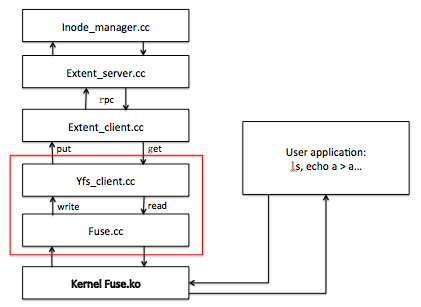
In lab2, what you should concern about are the parts framed by the red box above: FUSE and YFS client.
The FUSE interface, in fuse.cc. It translates FUSE operations from the FUSE kernel modules into YFS client calls. We provide you with much of the code needed to register with FUSE and receive FUSE operations. We have implemented all of those methods for you except for Symbol Link. So don't modify fuse.cc unless you want to implement Symbol Link.
The YFS client, in yfs_client.{cc,h}. The YFS client implements the file system logic. For example, when creating a new file, your yfs_client will add directory entries to a directory block.
If you have questions about this lab, either in programming environment or requirement, please ask TA: Gu Jinyu (sjtu_gujinyu@qq.com).
Getting started
% mkdir lab-cse
% cd lab-cse
% git clone http://ipads.se.sjtu.edu.cn:1312/gjy/cse-2015.git lab2 -b lab2
% cd lab2
Note: here when you execute “git branch” you should see that you are in lab2 branch
% cp ../lab1/inode_manager.* ./
% make
If there's no error in make, an executable file yfs_client will be generated.
If you added/edited files other than inode_manager.* during your first lab, please do a git merge like this:
%cd lab1
%git commit -am "my solution to lab1"
%git pull
%git checkout lab2
%git merge lab1
Note: For Labs 2 and beyond, you'll need to use a computer that has the FUSE module, library, and headers installed. You should be able to install these on your own machine by following the instructions at here.
We provide you with the script start.sh to automatically start yfs_client, and stop.sh to kill previously started processes. Actually, start.sh starts one yfs_client with ./yfs1 mountpoint. Thus you can type:
% cd lab2
% make
% sudo ./start.sh
% sudo ./test-lab-2-a.pl ./yfs1
% sudo ./test-lab-2-b.pl ./yfs1
% sudo ./stop.sh
Note 1: Since you need to mount fuse file system, so you should add sudo to above commands;
Note 2: If stop.sh reports "Device or resource busy", please keep executing stop.sh until it says "not found in /etc/mtab", such as:
fusermount: entry for /home/your_name/yfs-class/yfs1 not found in /etc/mtab
fusermount: entry for /home/your_name/yfs-class/yfs2 not found in /etc/mtab
...
This lab will be divided into 4 parts:
At the beginning, it will be helpful to scan the interfaces and structs in yfs_client.h and some other files. The functions you have implemented in lab1 are the fundament of this lab.
Part 1: CREATE/MKNOD, LOOKUP, and READDIR
Your job
In Part 1 your job is to implement the CREATE/MKNOD, LOOKUP and READDIR of yfs_client.cc in YFS. You may modify or add any files you like, except that you should not modify the test scripts. Your code should pass the test-lab-2-a.pl script, which tests creating empty files, looking up names in a directory, and listing directory contents.
On some systems, FUSE uses the MKNOD operation to create files, and on others, it uses CREATE. The two interfaces have slight differences, but in order to spare you the details, we have given you wrappers for both that call the common routine createhelper(). You can see it in fuse.cc.
As before, if your YFS passes our tester, you are done. If you have questions about whether you have to implement specific pieces of file system functionality, then you should be guided by the tester: if you can pass the tests without implementing something, then you do not have to implement it. For example, you don't need to implement the exclusive create semantics of the CREATE/MKNOD operation.
Detailed Guidance
When creating a new file (fuseserver_createhelper) or directory (fuseserver_mkdir), you must assign a unique inum (which you’ve done in lab1).
Note: Though you are free to choose any inum identifier you like for newly created files, FUSE assumes that the inum for the root directory is 0x00000001. Thus, you'll need to ensure that when yfs_client starts, it is ready to export an empty directory stored under that inum.Directory format: Next, you must choose the format for directories. A directory's content contains a set of name to inode number mappings. You should store a directory's entire content in a directory (recall what you learned). A simple design will make your code simple. You may refer to the FAT32 specification or the EXT inode design for an example to follow.
Note: As is mentioned in Wikipedia (http://en.wikipedia.org/wiki/Ext3), the EXT3 filesystem which we go after supports any characters but '\0' and '/' in the filename. Make sure your code passes when there's '$', '_', ' ', etc, in the filename.FUSE:When a program (such as ls or a test script) manipulates a file or directory (such as yfs1) served by your yfs_client, the FUSE code in the kernel sends corresponding operations to yfs_client via FUSE. The code we provide you in fuse.cc responds to each such operation by calling one of a number of procedures, for create, read, write, etc. operations. You should modify the relevant routines in fuse.cc to call methods in yfs_client.cc. fuse.cc should just contain glue code, and the core of your file system logic should be in yfs_client.cc. For example, to handle file creation, fuseserver_createhelper to call yfs->create(...), and you should complete the create(...) method to yfs_client.cc. Look at getattr() in fuse.cc for an example of how a fuse operation handler works, how it calls methods in yfs_client, and how it sends results and errors back to the kernel. YFS uses FUSE's "lowlevel" API.
YFS code:The bulk of your file system logic should be in yfs_client, for the most part in routines that correspond to fuse operations (create, read, write, mkdir, etc.). Your fuse.cc code should pass inums, file names, etc. to your yfs_client methods. Your yfs_client code should retrieve file and directory contents from the extent client with get(), using the inum as the extent ID. In the case of directories, your yfs_client code should parse the directory content into a sequence of name/inum pairs (i.e. yfs_client::dirents), for lookups, and be able to add new name/inum pairs.
A reasonable way to get going on fuss.cc is to run test-lab-2-a.pl, find the function in fuse.cc whose missing implementation is causing the tester to fail, and start fixing that function. Look at the end of yfs_client1.log and/or add your own print statements to fuse.cc. If a file already exists, the CREATE operator (fuseserver_create and fuseserver_mknod) should return EEXIST to FUSE.
start.sh redirects the STDOUT and STDERR of the servers to files in the current directory. For example, any output you make from fuse.cc will be written to yfs_client1.log. Thus, you should look at these files for any debug information you print out in your code.
If you wish to test your code with only some of the FUSE hooks implemented, be advised that FUSE may implicitly try to call other hooks. For example, FUSE calls LOOKUP when mounting the file system, so you may want to implement that first. FUSE prints out to the yfs_client1.log file the requests and results of operations it passes to your file system. You can study this file to see exactly what hooks are called at every step.
About Test
The Lab 1 tester for Part 1 is test-lab-2-a.pl. Run it with your YFS mountpoint as the argument. Here's what a successful run of test-lab-2-a.pl looks like:
% make
% sudo ./start.sh
starting ./yfs_client /home/lab/Courses/CSE-g/lab1-sol/yfs1 > yfs_client1.log 2>&1 &
% sudo ./test-lab-2-a.pl ./yfs1
create file-yyuvjztagkprvmxjnzrbczmvmfhtyxhwloulhggy-18674-0
create file-hcmaxnljdgbpirprwtuxobeforippbndpjtcxywf-18674-1
…
Passed all tests!
The tester creates lots of files with names like file-XXX-YYY-Z and checks that they appear in directory listings.
If test-lab-2-a.pl exits without printing "Passed all tests!", then it thinks something is wrong with your file server. For example, if you run test-lab-2-a.pl on the skeleton code we give you, you'll probably see some error message like this:
test-lab-2-a: cannot create /tmp/b/file-ddscdywqxzozdoabhztxexkvpaazvtmrmmvcoayp-21501-0 : No such file or directory
This error message appears because you have not yet provided code to handle the CREATE/MKNOD operation with FUSE. That code belongs in fuseserver_createhelper in fuse.cc
Note: testing Part 1 on the command line using commands like touch will not work until you implement the SETATTR operation in Part 2. For now, you should do your testing via the creat/open, lookup, and readdir system calls in a language like Perl, or simply use the provided test script.
Note: if you are sure that there is not any mistake in your implementation for part1 and still cannot pass this test, maybe there are some bugs in your lab1, especially read_file and write_file. Remeber that passing the test do not guarantee completely correct.
Part 2: SETATTR, READ, WRITE
Your job
In Part 2 your job is to implement SETATTR, WRITE, and READ FUSE operations in fuse.cc and yfs_client.cc. Once your server passes test-lab-2-b.pl, you are done. Please don't modify the test program or the RPC library. We will use our own versions of these files during grading.
Detailed Guidance
Implementing SETATTR. The operating system can tell your file system to set one or more attributes via the FUSE SETATTR operation. See fuse_lowlevel.h for the relevant definitions. The to_set argument to your SETATTR handler is a mask that indicates which attributes should be set. There is really only one attribute (the file size attribute) you need to pay attention to (but feel free to implement the others if you like), indicated by bit FUSE_SET_ATTR_SIZE. Just AND (i.e., &) the to_set mask value with an attribute's bitmask to see if the attribute is to be set. The new value for the attribute to be set is in the attar parameter passed to your SETATTR handler. The operating system may implement overwriting an existing file with a call to SETATTR (to truncate the file) rather than CREATE. Setting the size attribute of a file can correspond to truncating it completely to zero bytes, truncating it to a subset of its current length, or even padding bytes on to the file to make it bigger. Your system should handle all these cases correctly.
Implementing READ/WRITE:A read (fuseserver_read) wants up to size bytes from a file, starting from a certain offset. When less than size bytes are available, you should return to fuse only the available number of bytes. See the manpage for read(2) for details. For writes (fuseserver_write), a non-obvious situation may arise if the client tries to write at a file offset that's past the current end of the file. Linux expects the file system to return '\0's for any reads of unwritten bytes in these "holes" (see the manpage for lseek(2) for details). Your write should handle this case correctly.
About Test
test-lab-2-b.pl tests reading, writing, and appending to files. To run the tester, first start one yfs_client using the start.sh script.
% sudo ./start.sh
Now run test-lab-2-b.pl by passing the yfs1 mountpoint.
% sudo ./test-lab-2-b.pl ./yfs1

Write and read one file: OK
Write and read a second file: OK
Overwrite an existing file: OK
Append to an existing file: OK
Write into the middle of an existing file: OK
Check that one cannot open non-existant file: OK
Check directory listing: OK
Passed all tests
% sudo ./stop.sh
If test-lab-2-b.pl exits without printing "Passed all tests!" or hangs indefinitely, then something is wrong with your file server. After you are done with Part 2, you should go back and test with test-lab-2-a.pl again to make sure you did not break anything.
Part 3: MKDIR and UNLINK
Your job
In Part 3 your job is to handle the MKDIR and UNLINK FUSE operations. For MKDIR, you do not have to create "." or ".." entries in the new directory since the Linux kernel handles them transparently to YFS. UNLINK should always free the file's extent; you do not need to implement UNIX-style link counts.
About Test
If your implementation passes the test-lab-2-c.pl script, you are done with part 3. The test script creates a directory, creates and deletes lots of files in the directory, and checks file and directory mtimes and ctimes. Note that this is the first test that explicitly checks the correctness of these time attributes. A create or delete should change both the parent directory's mtime and ctime (here you should decide which level you can modify the 3 time attributes, and think about why?). Here is a successful run of the tester:
% sudo ./start.sh
% sudo ./test-lab-2-c .pl ./yfs1

mkdir ./yfs1/d3319
create x-0
delete x-0
create x-1
checkmtime x-1
...
delete x-33
dircheck
Passed all tests!

% sudo ./stop.sh
Note: Now run the command sudo ./grade and you should pass A, B, C and E.
Part 4: SYMLINK, READLINK
Please implement symbolic link. To implement this feature, you should refer to the FUSE documentation available online and figure out the methods you need to implement. It's all on yourself. Also, look out for comments and hints in the hand-out code.
Note: remember to add related method to fuse.cc.
You may want to refer to this and this.
GRADING
Finally, after you've implemented all these features, run the grading script:
./grade.sh
Passed A
Passed B
Passed C
Passed D
Passed E
Passed all tests!

Total score: 100
Note that if you encounter a "yfs_client DIED", your filesystem is not working. In such cases the requests are served by the system's file system (usually EXT3 or btrfs or tmpfs). You would not be awarded credits if your yfs_client crashes, but could get partial credit if it produces incorrect result for some test cases. So do look out for such mistakes. We've seen dozens of students every year thinking that they've passed lots of tests before realizing this.
Handin procedure
After all above done:
% cd ~/lab2
% make handin
That should produce a file called lab2.tgz in your lab2/ directory. Change the file name to your student id:
% mv lab.tgz lab2_[your student id].tgz
Then upload lab2_[your student id].tgz file to ftp://535603986:public@public.sjtu.edu.cn/upload/lab2 before the deadline. You are only given the permission to list and create new file, but no overwrite and read. So make sure your implementation has passed all the tests before final submit.
You will receive full credits if your software passes the same tests we gave you when we run your software on our machines.