Lab #3: RPC
Due: 2015-4-17 00:00
Introduction
In this lab, you will use RPC to implement a single client file server.
In the previous lab, you have finished a filesystem on a single machine. And in lab 3 (and 4), your aim is to extend it to a distributed file server. And from the architectural point of view, it now moves on to the RPC part.
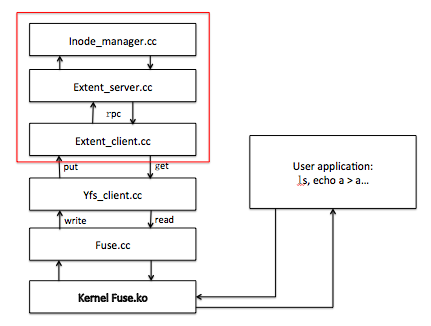
If you have questions about this lab, either in programming environment or requirement, please ask TA: Yang Zheng (tomsun.0.7@gmail.com).
Getting started
% cd lab-cse
% git clone http://ipads.se.sjtu.edu.cn:1312/gjy/cse-2015.git lab3 -b lab3
% cd lab3
Note: here when you execute “git branch” you should see that you are in lab3 branch.
Now, copy all your modified files(except fuse.cc) in lab2 to this lab3 directory. You'll also need to modify constructor for yfs_client class like the one we give in lab3's yfs_client.{hh,cc} after copying these two*, i.e.:
modify
yfs_client::yfs_client(std::string extent_dst, std::string lock_dst)
to
yfs_client::yfs_client(std::string extent_dst)
(*thanks the feedback from Zhiqiang Huang)
% make
if there's no error in make, 3 executable files yfs_client, extent_server, test-lab-3-g will be generated.
Note: For Lab2 and beyond, you'll need to use a computer that has the FUSE module, library, and headers installed. You should be able to install these on your own machine by following the instructions at FUSE: Filesystem in Userspace (see Lab Information)
Note: Both 32-bit and 64-bit librpc are provided, so the lab should be architecture independent.
Note: For this lab, you will not have to worry about server failures or client failures. You also need not be concerned about malicious or buggy applications.
Distributed FileSystem (Strawman's Approach)
In lab2, we have implemented a file system on a single machine. In this lab, we just extend the single machine fils system to a distributed file system.
Separating extent service from yfs logic brings us a lot of advantages, such as no fate sharing with yfs client, high availability.
Luckily, most of your job has been done in the previous lab. You now can use extent service provided by extent_server through RPC in extent_client. Then a strawman distributed file system has been finished.
You had better test your code with the previous test suit before any progress.
Detailed Guidance
In principle, you can implement whatever design you like as long as it satisfies the requirements in the "Your Job" section and passes the testers. In practice, you should follow the detailed guidance below.
Using the RPC system: - The RPC library. In this lab, you don't need to care about the implementation of RPC mechanisms, rather you'll use the RPC system to make your local filesystem become a distributed filesystem. - A server uses the RPC library by creating an RPC server object (rpcs) listening on a port and registering various RPC handlers (see main() function in demo_server.cc). - A client creates a RPC client object (rpcc), asks for it to be connected to the demo_server's address and port, and invokes RPC calls (see demo_client.cc). - You can learn how to use the RPC system by studying the stat call implementation. please note it's for illustration purpose only, you won't need to follow the implementation -use make rpcdemo to build the RPC demo - RPC handlers have a standard interface with one to six request arguments and a reply value implemented as a last reference argument. The handler also returns an integer status code; the convention is to return zero for success and to return positive numbers for various errors. If the RPC fails in the RPC library (e.g.timeouts), the RPC client gets a negative return value instead. The various reasons for RPC failures in the RPC library are defined in rpc.h under rpc_const. - The RPC system marshalls objects into a stream of bytes to transmit over the network and unmarshalls them at the other end. Beware: the RPC library does not check that the data in an arriving message have the expected type(s). If a client sends one type and the server is expecting a different type, something bad will happen. You should check that the client's RPC call function sends types that are the same as those expected by the corresponding server handler function. - The RPC library provides marshall/unmarshall methods for standard C++ objects such asstd::string, int, and char. You should be able to complete this lab with existing marshall/unmarshall methods.
Testers & Grading
The test for this lab is test-lab-3-g. The test take two directories as arguments, issue operations in the two directories, and check that the results are consistent with the operations. Here's a successful execution of the tester:
% ./start.sh
starting ./extent_server 29409 > extent_server.log 2>&1 &
starting ./yfs_client /home/cse/cse-2014/yfs1 29409 > yfs_client1.log 2>&1 &
starting ./yfs_client /home/cse/cse-2014/yfs2 29409 > yfs_client2.log 2>&1 &
% ./test-lab-3-a ./yfs1 ./yfs2
Create then read: OK
Unlink: OK
Append: OK
Readdir: OK
Many sequential creates: OK
Write 20000 bytes: OK
test-lab-2-a: Passed all tests.
% ./stop.sh
To grade this part of lab, a test script grade.sh is provided. It contains are all tests from lab2 (tested on both clients), and test-lab-3-g. Here's a successful grading.
% ./grade.sh
Passed A
Passed B
Passed C
Passed D
Passed E
Passed test-lab-3-g (consistency)
Passed all tests!
Lab 3 OK
Tips
- This is also the first lab that writes null ('\0') characters to files. The std::string(char*)constructor treats '\0' as the end of the string, so if you use that constructor to hold file content or the written data, you will have trouble with this lab. Use the std::string(buf, size) constructor instead. Also, if you use C-style char[] carelessly you may run into trouble!
- Do notice that a non RPC version may pass the tests, but RPC is checked against in actual grading. So please refrain yourself from doing so ;)
Handin procedure
After all above done:
% make handin
That should produce a file called lab3.tgz in the directory. Change the file name to your student id: % mv lab3.tgz lab3[your student id].tgz Then upload lab3[your student id].tgz file to ftp://535603986:public@public.sjtu.edu.cn/upload/lab3 before the deadline. You are only given the permission to list and create new file, but no overwrite and read. So make sure your implementation has passed all the tests before final submit.
You will receive full credits if your software passes the same tests we gave you when we run your software on our machines.␘